Property management software

Your rentals, on a platform that is yours.

Your firm’s platform, under your name.

MDV gives you a private workspace you shape yourself: your web address, your look, your forms and agreements, with rent, applications, leases and repairs built in.

MDV gives your firm a private workspace under your own name: your address, your look, your forms, agreements and team roles, with every client’s data kept apart.

Try a sandboxRequest accessBook a 20-minute walkthrough

  • Your address, your name, your look
  • A private database for every company
  • We set it up with you
Illustration of an apartment building, one window per unit, coloured by rent status
22 of 28 rents paidIllustrated building, 30 units

Take a look around

  • 4portals: tenants, owners, vendors and applicants
  • 10units free, then $1 a unit a month
  • 2languages, English and Spanish
  • 1private database for every company

Real days, handled.

Six situations every landlord knows, and what happens in the portal when they come up.

  • A tenant reports a leak at 9 pm

    1. The photos and the description arrive on one record.
    2. You assign an insured vendor, who gets a private link on their phone.
    3. The tenant follows each step and confirms the fix.
  • Two guests book the same weekend

    1. Airbnb and VRBO calendar links are read every four hours.
    2. The overlap turns red, with a warning on top.
    3. You cancel one on the platform and the calendar follows.
  • Rent is a few days late

    1. A reminder goes by email, and by text or WhatsApp if the tenant agreed.
    2. A Zelle payment waits for your approval before it is recorded.
    3. The payment lands on the right tenant and the balance updates.
  • The owner asks how September went

    1. The statement builds itself from entries already in the platform.
    2. Your fee is none, a flat amount or a share of the income.
    3. It prints in English or Spanish, and the owner can read it in their portal.
  • The accountant wants the books

    1. Pick the period and the property.
    2. Choose CSV, QuickBooks or Xero.
    3. Send the file. Nobody shares a login.
  • A vendor’s insurance is about to expire

    1. Certificates are kept with their expiry dates.
    2. Reminders go out at 30, 14 and 7 days.
    3. You choose who can still be assigned to a job.

See every feature

From chasing to knowing.

What a normal week looks like before and after.

Before

  • Chasing rent by text and a spreadsheet
  • Repairs lost in chat threads
  • Owners calling for numbers
  • Leases and forms in separate tools

After

  • Invoices and reminders go out on their own
  • Every repair on one record, with photos
  • Owners open their own statements
  • Leases signed online and kept with the unit

Make it yours. All of it.

You are not renting a login to someone else’s software. You get a private workspace, shaped to your business and run under your name.

  • Your address

    Tenants, owners and applicants sign in at your own web address.

  • Your name

    Every email, invoice, lease and statement carries your brand name.

  • Your look

    Colours, fonts, a logo and a landing page built from blocks. Schedule changes, and go back to any earlier version.

  • Your forms

    Design the application form: your questions, your rules.

  • Your agreements

    Write your leases and notices once, then send them for signature.

  • Your team’s access

    Build roles section by section, and limit them to one country.

  • Your accounts

    Payments, email and e-signature run on accounts that belong to you.

  • Your data

    A private database that is yours alone. Nothing is shared with another company.

See how you shape itTry a sandbox

Pick a look, add your logo and publish at your own address. Illustrative film with made-up data.

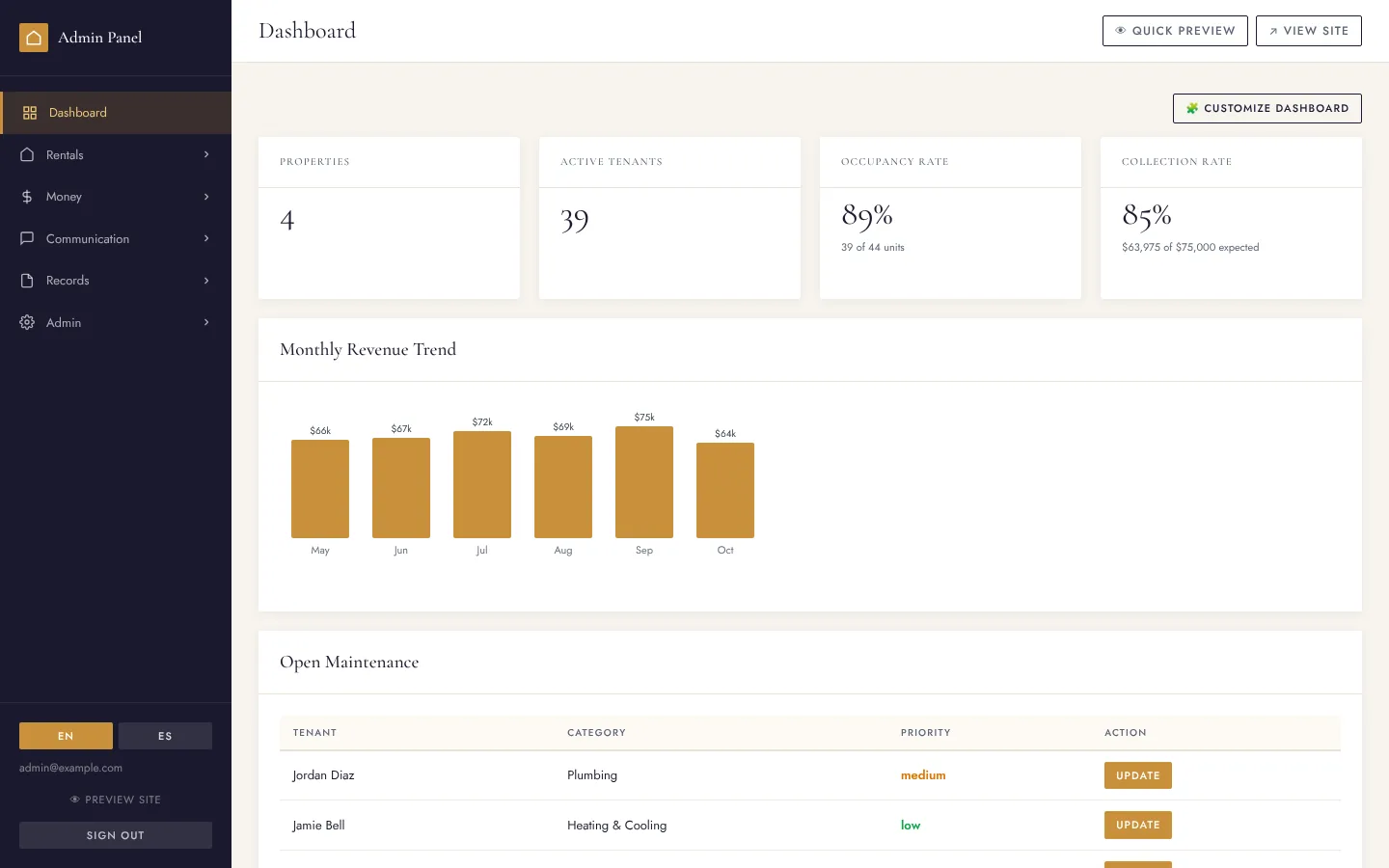
The whole operation on one screen.

Occupancy, collections, revenue and open repairs, live for every property you manage.

Manager dashboard
The manager dashboard with property and tenant counts, tenants waiting for approval and open maintenance requests, next to the menu of every section

See it move.

Nine short animated films of how the portal works. They are illustrations that use made-up tenants and made-up money, not recordings of a real company.

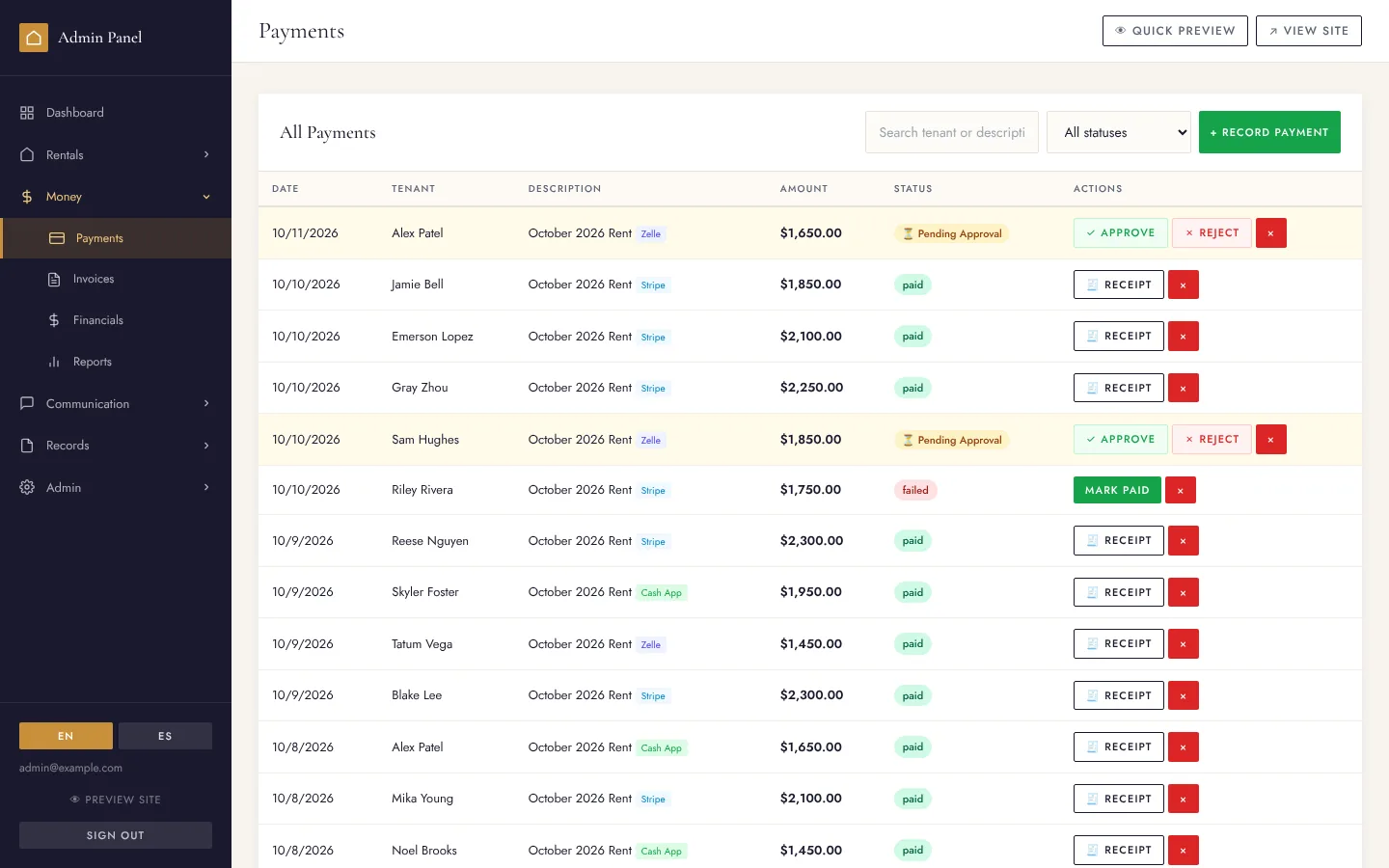
Invoices go out, payments land, reminders and Zelle approvals are handled. Illustrative film with made-up data.

Invoices out, payments in.

Every invoice goes out on the 1st and every payment lands on the right tenant. Late? A reminder goes out on its own. Paid by Zelle? It waits for your approval.

See how it works

Illustrated building

A month in the building.

The 1st: invoices go out.

Every unit gets its invoice automatically, with reminders before it is late. You do not send a thing.

Every unit in every property gets its invoice automatically, with reminders before it is late. Nobody on your team sends them by hand.

TenantManager
Rent comes in.

Tenants pay by card or set up autopay. Payments made by Zelle are recorded and wait for your approval.

Tenants pay by card or set up autopay. Payments made by Zelle are recorded and wait for a team member’s approval.

TenantManager

A repair is reported.

A tenant reports a leak from their own portal. You see it by priority, and the vendor gets the job on a page of their own.

A tenant reports a leak from their own portal. Your team sees it by priority, and the vendor gets the job on a page of their own.

TenantManagerVendor

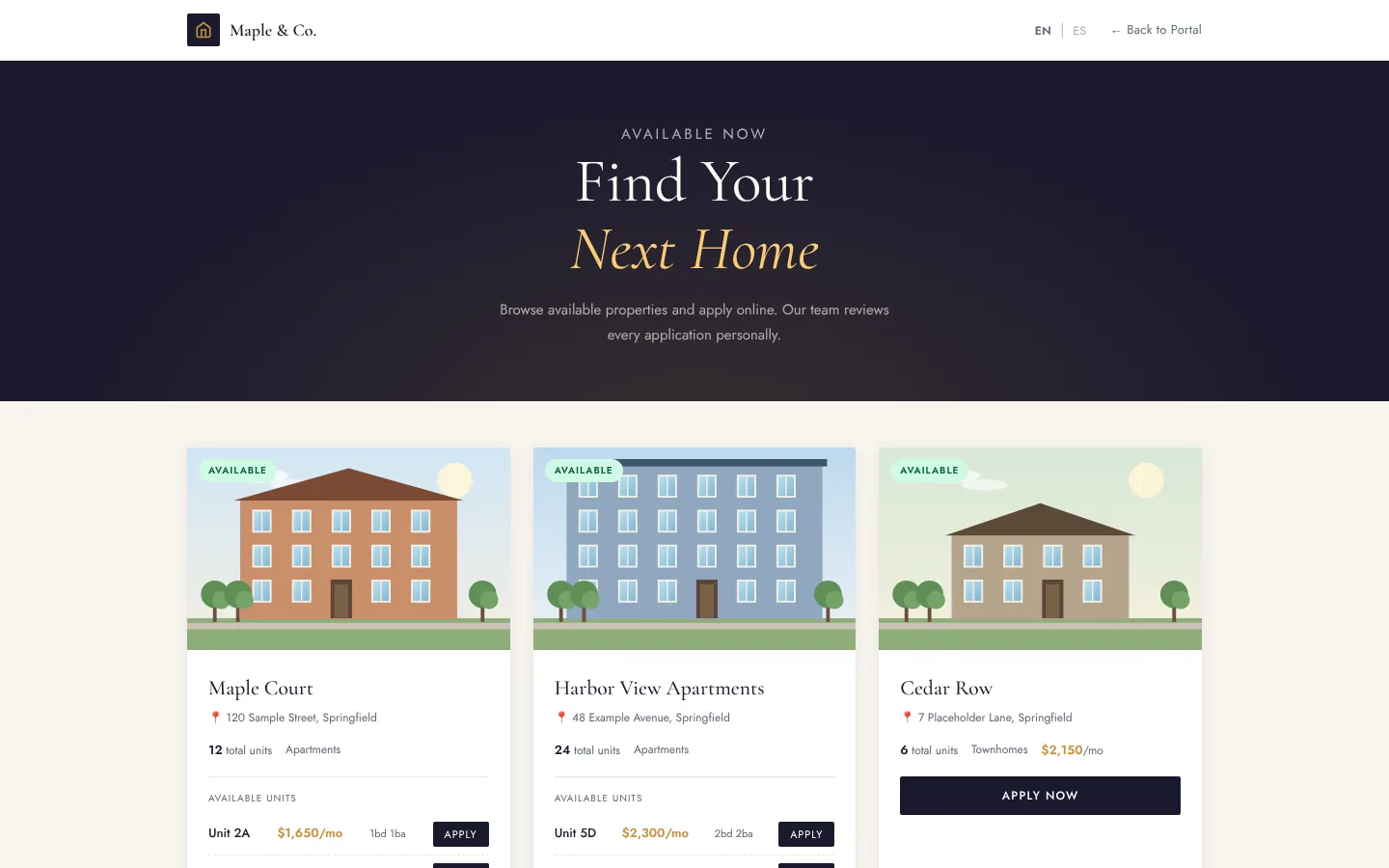
A lease is signed.

A new tenant applies online, verifies their income and signs electronically. The vacant unit fills.

An applicant applies online, verifies their income and signs electronically. Your team reviews every application, and the vacant unit fills.

ApplicantManager

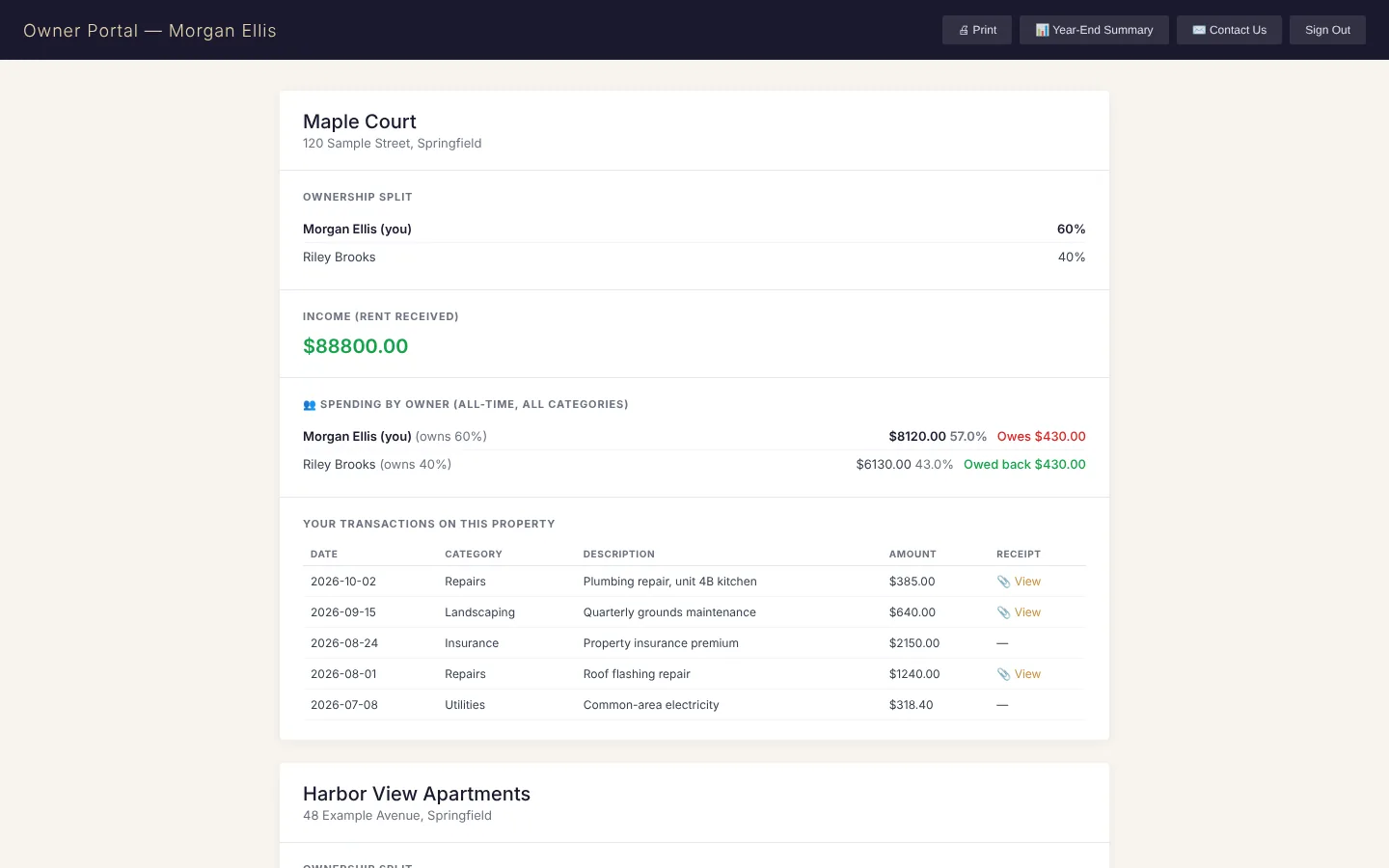
Owners check in.

If you share a property with co-owners, each one sees their own share: income, spending by owner and receipts.

Each owner sees only their own properties: income, expenses with receipts and a year-end summary. Fewer calls to your office.

Owner

One platform. A view for everyone.

Tenants, owners, applicants and your team each sign in to a screen built for what they need, and nothing more.

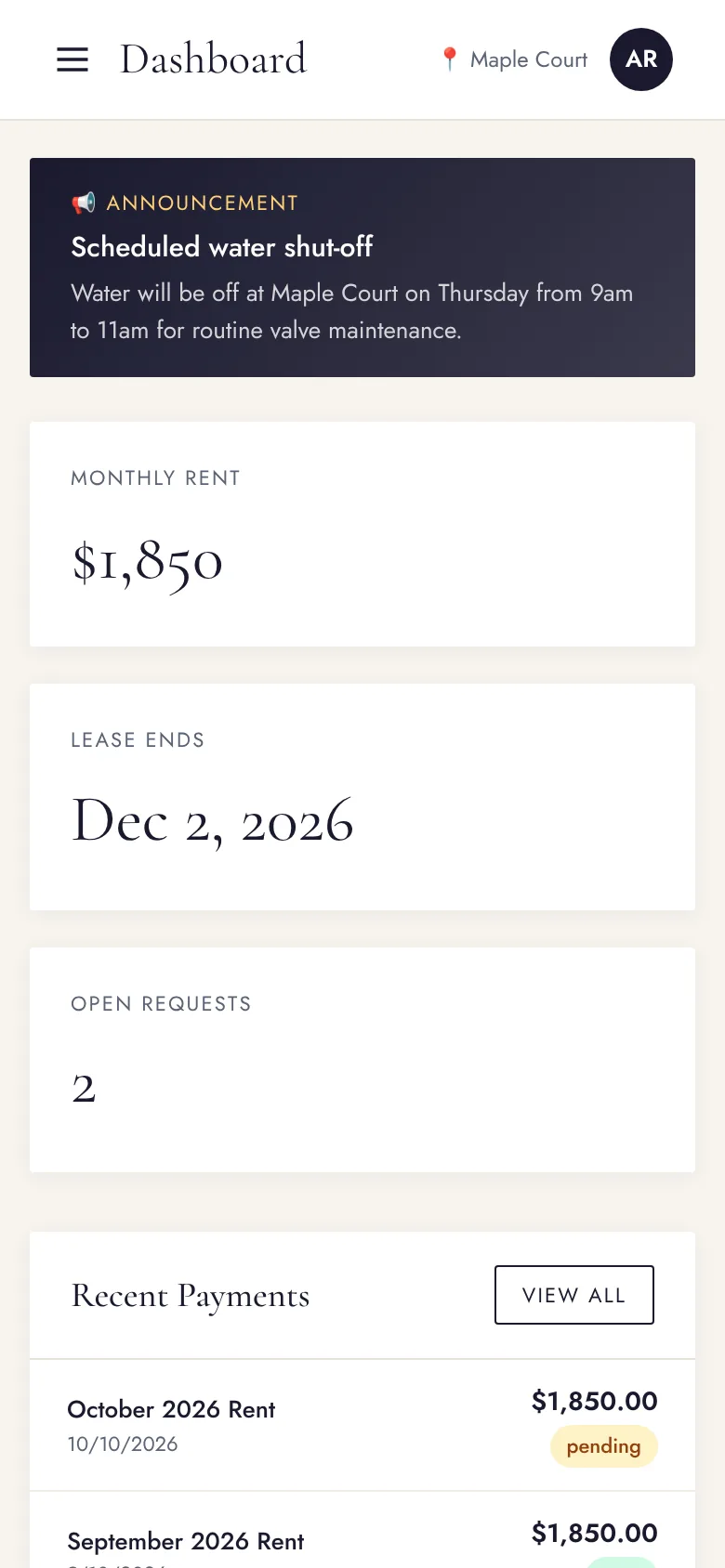
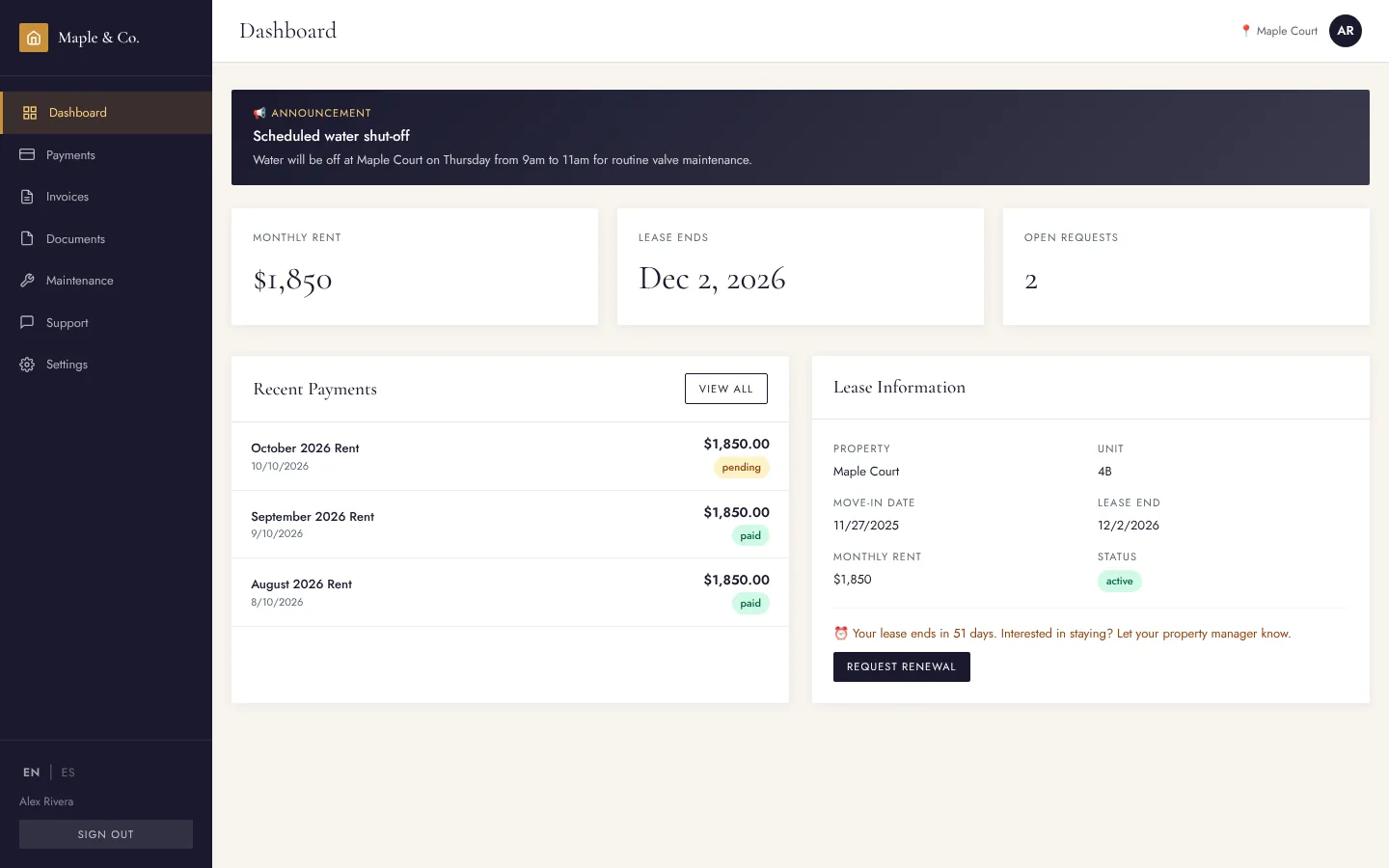
A tenant’s own dashboard

  • Rent, lease dates and every payment in one place.
  • Report a repair and follow it until it is done.
  • Announcements from you, and a button to ask for a renewal.
  • English and Spanish, one tap apart.
Tenant portal
A tenant dashboard showing announcements, the balance due, monthly rent, lease end date, open repair requests, recent payments and lease information
The same tenant dashboard on a phone

Product screens are shown with illustrative data.

Everything the work needs, already connected.

Rent, leases, applications and repairs share one record for each unit, so nothing is re-typed and nothing falls between two tools.

  • Rent and payments

    Invoices go out on schedule. Tenants pay by card or autopay, Zelle payments wait for approval, and receipts print in one click.

  • Leases and e-signature

    Send a lease for electronic signature and keep the signed copy with the unit.

  • Applications and income checks

    Applicants apply online, upload their documents and verify income. Your team reviews every application.

  • Maintenance and vendors

    Tenants report repairs from their portal. You see them by priority and vendors get the job on a page of their own.

  • Owner reporting

    Each owner sees their properties’ income, expenses with receipts and a year-end summary.

  • Documents and receipts

    Every lease, receipt and notice stays attached to its tenant and unit.

  • Reminders and compliance

    Rent reminders, annual property events and vendor compliance renewals go out on their own.

  • Announcements and support

    Post announcements to your tenants and handle their requests, in English or Spanish.

  • Text and WhatsApp, with consent

    Reminders and notices by text or WhatsApp, only to people who said yes. Replying STOP ends it at once.

  • Your own accounts

    Stripe or Bold for cards, your own mail server, Twilio for texts, Documenso for signatures, SingleKey, RentPrep, Truv or Plaid for checks.

  • API, webhooks and Zapier

    Read your properties, invoices, payments and repairs from your own tools, and get a signed message when something changes.

  • Roles and single sign-on

    Give each person exactly the access they need, and let them sign in with your company’s own account.

Works with the services you already use.

Connect your own accounts for money, mail, texts, files, signatures and checks. Change a provider later and nothing else has to change.

  • Payments

    • Stripe
    • Bold Payments
    • Zelle
    • Cash App
  • Email

    • Your own SMTP server
    • SendGrid
    • Mailgun
    • Postmark
    • Amazon SES
  • Texts and WhatsApp

    • Twilio
    • Telnyx
    • ClickSend
  • Files

    • Cloudinary
    • Cloudflare R2
  • Signatures

    • Documenso
    • Firma
  • Screening and income

    • SingleKey
    • RentPrep
    • Truv
    • Plaid
  • Calendars

    • Google Calendar
    • Outlook
    • Apple Calendar
  • Sign-in

    • SAML single sign-on
  • AI

    • Anthropic
    • OpenAI
    • Gemini
    • DeepSeek
    • Groq
    • OpenRouter
  • Automation

    • Public API
    • Webhooks
    • Zapier

See every integration

Service names belong to their owners. MDV connects to these services and is not affiliated with them.

AI that drafts. You decide.

Connect your own AI account and set a daily spending cap. The assistants write drafts for you to read and change, and nothing is sent without a person pressing send.

  • Draft replies to owners’ messages and to tenants’ texts (preview).
  • A payment note for an unpaid invoice, and a listing description from the facts on file (preview).
  • Read a receipt photo into an expense for you to check (preview).
  • Repair requests sorted for you, and a question box for your reports.

Built to be trusted with your tenants’ data.

Rental records hold names, leases and money. We treat them that way.

  • Your data stays yours

    Every company gets its own private database and sign-in. Nothing is shared with another client.

  • Access by role

    Staff accounts get permissions by section. People see what their job needs, and nothing else.

  • Every change on record

    Changes our team makes on your behalf are written to an audit log you can review.

  • Specialists for money and signatures

    Card payments run on Stripe and leases are signed electronically, so the sensitive steps rely on providers that do only that.

What changes for you

What changes for your firm

Less keeping track, more of your own time.

A portal under your name, and your team working in one place.

  • No spreadsheet to keep in sync: payments, leases and repairs live with each unit.
  • Your tenants get their own sign-in, in English or Spanish.
  • Your records stay yours, in a database that no one else shares.
  • We set it up with you, so it is ready for your tenants on day one.
  • Your own web address, so tenants and owners see your name.
  • Staff accounts with permissions by section, and a log of changes.
  • Owner portals with income, expenses and receipts, so owners stop calling.
  • Your data is kept apart from every other company’s: its own database and sign-in.
  • We help with the setup, and every change we make for you is written to an audit log.

How you get started.

Look around in a sandbox first, or ask for your own workspace. We build it with you, so it is ready for your tenants on day one.

  1. Tell us about your portfolio.Use the form below: who you are, how many units, where.
  2. We build your workspace.A private database, your address and your first administrator.
  3. You invite your people.Tenants, owners and vendors sign in and each sees their part.

Ready to run it properly?

Tell us a little about your rentals. We reply by email, and you can book a short walkthrough.

  • We read every request ourselves.
  • No payment details, and nothing to install.
  • Your answers are used only to reply to you.

Want to look around first?

Try a sandbox with sample data

Prefer to write?

support@mdv-ai.com

By sending this you agree to our Privacy policy and Terms.